Overview
Devices are the first stage in the DataStream processing flow. They receive telemetry from external sources and convert that data to a standardized format for pipeline processing.
Provider → Device → Preprocessing → Pipeline → Postprocessing → Target → Consumer
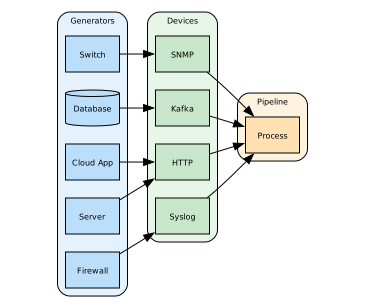
As such, they are defined using a standardized YAML configuration format that specifies its behavior, connection parameters, and processing options. DataStream uses devices as an abstraction layer that decouples data sources from pipelines.
Each device type provides specific configuration options detailed in their respective sections. For GUI-based device management, see Devices Management. To apply reusable collection rules across multiple devices, see Datasets and Profiles.
Definitions
Devices operate on the following principles:
- Unified Configuration Structure: All devices share a common configuration framework with device-specific properties.
- Data Collection: Devices receive data through network connections, APIs, or direct system access.
- Pipeline Integration: Devices can link to preprocessing pipelines for data transformation.
- Stateful Operation: Devices maintain their operational state and can be enabled or disabled.
Devices enable:
Authentication: Basic authentication, API keys, HMAC signing, and client certificates.
Encryption: TLS/SSL, SNMPv3 privacy, and custom encryption.
They also provide access control, and audit logging.
Configuration
All devices share the following base configuration fields:
| Field | Required | Description |
|---|---|---|
id | Y | Unique numeric identifier |
name | Y | Device name |
description | N | Optional description of the device's purpose |
type | Y | Device type identifier (e.g., http, syslog, tcp) |
tags | N | Array of labels for categorization |
pipelines | N | Array of preprocessing pipeline references (processed sequentially). On Agents, enables local processing before data reaches Director. |
status | N | Boolean flag to enable/disable the device (default: true) |
Each device type provides specific options detailed in its respective section.
Use the id of the device to refer to it in your configurations.
Example:
devices:
  - id: 1
    name: http_logs
    type: http
    properties:
      port: 8080
      content_type: "application/json"
This is an HTTP device listening on port 8080, and it expects the incoming data to be in JSON format.
Device-to-Pipeline Handoff
When a device receives data, it performs initial format conversion before passing to pipelines:
- Raw Input: Device receives data in its native protocol format (syslog message, HTTP POST body, Kafka record, etc.)
- Parsing: Device parses protocol-specific headers and metadata
- Normalization: Device creates a standardized event structure with common fields (
message,host,timestamp) - Pipeline Input: Normalized event is passed to any attached preprocessing pipelines (via the
pipelinesfield)
Preprocessing pipelines attached to devices execute sequentially in the order specified. This enables filtering, enrichment, and transformation before data enters the routing stage.
Device Types
The system supports the following device types:
-
Protocols — Network listeners and flow collectors:
- Syslog: Specialized for syslog format messages with RFC compliance
- TCP: Receives messages over TCP connections with framing and TLS support
- UDP: Collects datagram-based messages with high throughput capabilities
- HTTP: Accepts JSON data via HTTP/HTTPS POST requests with authentication options
- eStreamer: Connects to Cisco eStreamer servers
- SNMP Trap: Receives SNMP trap notifications
- SMTP: Receives email messages for log processing
- NetFlow: Cisco NetFlow v5/v9 network traffic analysis
- sFlow: sFlow sampling-based network monitoring
- IPFix: IP Flow Information Export (IETF standard)
- TFTP: Receives files via Trivial File Transfer Protocol
-
Microsoft Azure — Azure cloud service integrations:
- Azure Blob Storage: Reads and processes files from Azure storage containers
- Azure Monitor: Collects alerts, logs, and metrics from Azure Monitor
- Event Hubs: Consumes events from Azure Event Hubs
- Microsoft Graph API: Polls Microsoft Graph API for audit logs, security events, identity protection, and reports
- Microsoft Sentinel: Collects security data from Microsoft Sentinel
-
Amazon Web Services — AWS cloud service integrations:
- Amazon S3: Processes files from Amazon S3 buckets using SQS event notifications
- Amazon Security Lake: Consumes OCSF Parquet files from Amazon Security Lake via SQS notifications
-
Message Queues — Messaging platform consumers:
- Kafka: Consumes from Apache Kafka topics
- NATS: Subscribes to NATS messaging subjects
- RabbitMQ: Consumes from RabbitMQ queues
- Redis: Subscribes to Redis pub/sub channels
-
Operating Systems — Agent-based system monitoring:
- Agents: VirtualMetric Agent deployment and management
- Windows: Collects Windows events via Agent
- Linux: Collects Linux logs and metrics via Agent
-
Other — Specialized integrations:
- Proofpoint On Demand: Consumes Proofpoint log stream via WebSocket
- WEC: Windows Event Collector server using WS-Management protocol
Use Cases
Devices can be used in the following scenarios:
-
Infrastructure monitoring: Provides system performance metrics, event logs, resource utilization, and service availability information.
-
Security operations: Enables security event monitoring, threat detection, compliance monitoring, and provides audit trails.
-
Application telemetry: Provides application logs and performance metrics, and enables error tracking and user activity monitoring.
-
Network monitoring: Provides network device logs and SNMP data, and enables traffic analysis and connection tracking.
Implementation Strategies
The following strategies optimize device deployment and data collection.
Monitoring
For monitoring operating systems, Director uses a unified agent-based approach with two types of deployment. For full deployment details, see Agents.
Managed (Traditional): The agent is installed and managed by system administrators. This provides persistent installation on the target system. Local data is buffered in the emergence of network issues. Director supports Windows, Linux, macOS, Solaris, and AIX.
Auto-managed (Agentless): The agent is automatically deployed and managed, no manual installation is required. Auto-managed agents provide local data buffering, network resilience, and performance optimization. This deployment type is self-healing, since the agent is automatically redeployed if the process terminates. Also, it supports remote credential management. Deployment is done using WinRM for Windows, and SSH for Linux, macOS, Solaris, and AIX.
Both approaches provide local data processing, store-and-forward capability against connectivity issues, real-time metrics and events, and native OS monitoring. The key difference is deployment and lifecycle management, not functionality.
Layered Collectors
Configure multiple devices to handle different aspects of data collection:
- External-facing HTTP endpoints for application logs
- Internal TCP/UDP listeners for network device logs
- Specialized connectors for cloud and security products